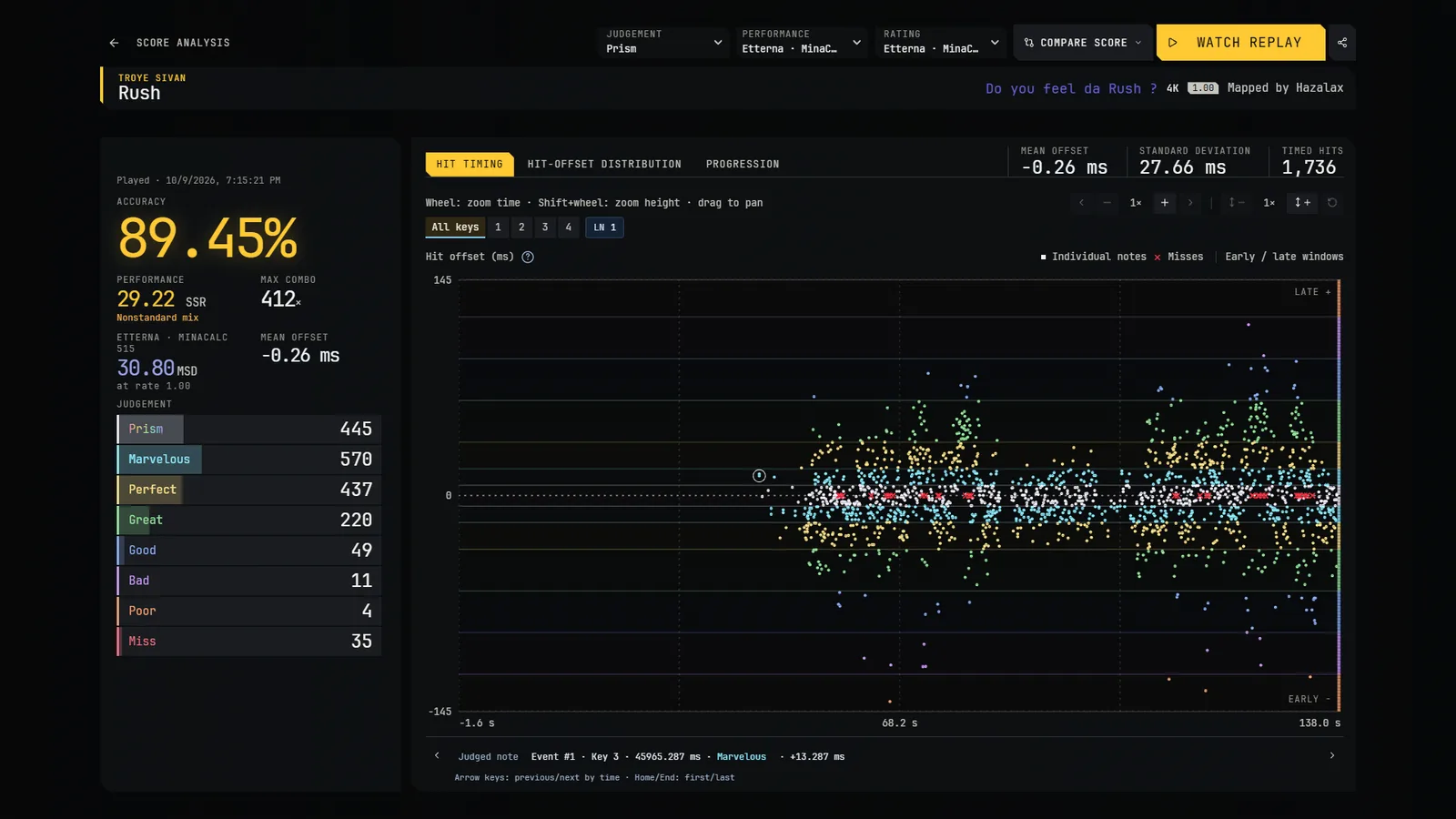
After a play
A summary shows when the map ends, including for an aborted play; it hides after ten seconds without deleting your score. After a finished play the game opens the replay analysis for it and brings you back to your selection afterwards.
Leaderboard
The selection screen has Info, Leaderboard and Mods tabs. The Leaderboard tab has a local view: it lists your own plays of the map, re-judged with the judgement you have selected now.
Its Online view shows the map's online leaderboard, read from this site. Each player appears once, with their best play, whatever the speed; plays are judged with the Prism judgement and ranked by their MinaCalc rating. Anyone can read it without an account, and the same leaderboard is on the map's page in Browse. It needs the game to be online ("Server unreachable" is shown otherwise, and nothing in Offline mode).
To appear in it you need a Prism account, a confirmed e-mail address and to be signed in in the game (see the FAQ). A play is sent to the game server only when it is ranked: it replays your inputs on its own copy of the map to check the result, then records it with its replay. Unranked plays (for example with a mod that changes the notes) are never sent. Online scores and their replays are public with your account name, and they disappear from the leaderboards when you delete your account.
Replay analysis
- Hit timing: every hit as an individual point, with its key, tier and real offset. A Miss is a bright red cross on the centre line, with no offset, and is left out of the offset statistics.
- Distribution of hits in the judgement colours, and progression over the song.
- Long-note analysis, and comparison between two scores.
- Zoom and pan on the graphs.
Watch replay
Watch replay plays the recorded inputs in the game at the recorded rate. It saves no new score.
Share and import
- The Share replay icon (on the analysis page and on each leaderboard card) writes the score as one
.pvreplayfile. - To open a file you received, use Open a replay file in the leaderboard, or drag the file onto the game window. The same works for osu!mania
.osrreplays (osu! stable or lazer). - The map must be installed. Otherwise the game shows the artist, title, difficulty, creator and key count so you can find it.
- Imported scores are ranked like the others and re-judged, but they never count in your profile. Importing the same file twice adds nothing.
Profile
Esc menu → Profile shows your finished plays re-judged with the current judgement: best and recent plays, skillset averages, achievements and goals.